Given One Example, Can AI Find Every Symbol on a Drawing?
Oct 19, 2026 · AI · Computer Vision · Engineering Drawings · Few-shot Learning
Why bother
I have long believed that if AI is going to understand the physical world, reading drawings is a step it cannot skip. Before a building exists, almost everything about it lives on drawings: where each device is, which line it connects to, which system it belongs to. And the first step in reading a drawing is recognizing and counting its symbols.
Fully supervised object detection handles this well, as long as every symbol class has enough labels. In practice, symbol styles differ between projects and design firms, new projects always bring symbols nobody has seen, and nobody wants to label hundreds of boxes for every project. So my question was: with one example per class, how far can we get? With five? And where exactly is the gap?
What follows is a record of two days of experiments (2026-10-18 to 10-19). Every number comes from the experiment logs. Hardware was a laptop with an Apple M2 and 16 GB of memory.
Data and evaluation protocol
The data is the public Firefighting Device Detection dataset on Roboflow Universe (v6 export, provided by a Roboflow user, licensed CC BY-NC-SA 4.0). It consists of screenshots of fire-alarm system drawings: 148 images, 41 classes, 3785 boxes. All drawing images in this post come from that dataset.
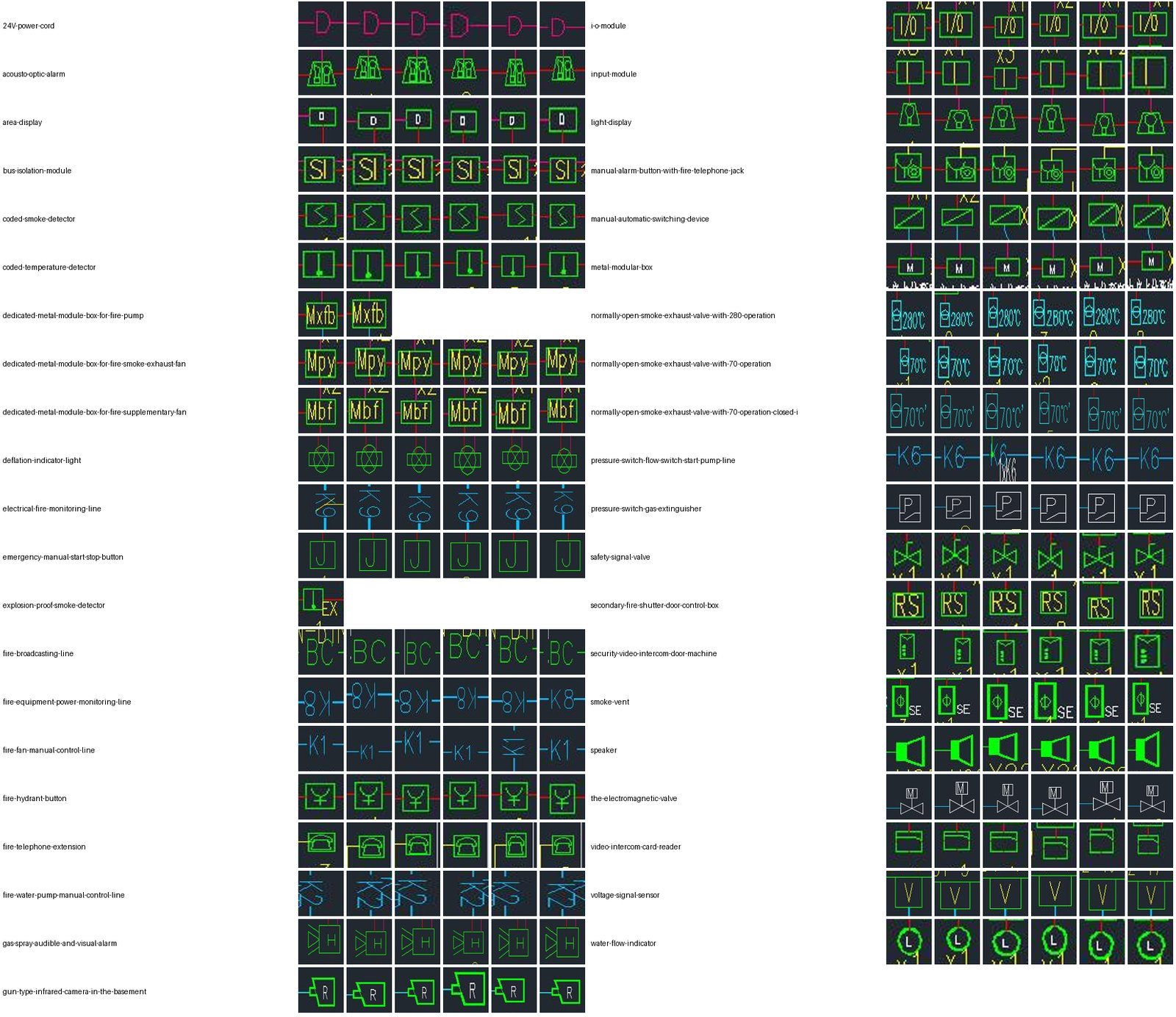
The “symbols” here come in two kinds:
- Graphic symbols: boxes, valves, speakers, cameras and so on. Some have text inside, such as Mpy, Mbf or 280°C.
- Wire markers: letters like D, K1, K8 or BC sitting on a wire to say which line it is. D marks the 24V power cord and is drawn as a bump on the wire. It makes up 38% of the test set.
I deliberately made the evaluation hard in one specific way, across drawings:
- The split is by source drawing (images whose file names share the first two fields count as one source drawing; 26 groups in total). The test set is 6 groups, 30 images, 824 boxes.
- Examples must come from training or validation groups, never from the same source drawing as a test image.
- 8 graphic classes never take part in any training. These are the “novel” classes.
- The main metric is F1 at IoU 0.5. 1-shot and 5-shot each run with 5 random seeds and report the mean.
The overall approach
I split the problem into “is there a symbol here” and “which symbol is it”:
- Class-agnostic detector: only answers “is this a symbol”, regardless of class.
- OCR: specifically to find the text markers on wires.
- Merging: assign text inside a box, and nearby counts (x2 and the like), to the right symbol.
- Classification: compare each candidate box with the examples of every class and take the most similar class.
- Rejection: output nothing if the score is too low or the top two classes are too close.
Step 1: a class-agnostic detector
I trained a single-class YOLO11s: every seen class is labeled “symbol”, and the 8 held-out classes are painted over with the surrounding background color in the training images. Training took 54.2 minutes in total (14.3 of them were a run aborted because of memory swapping).
On the test set, at confidence 0.1 and IoU 0.5:
- Recall on seen classes: 343/343 (100%).
- Recall on novel shapes it had never seen: 37/42 (88.1%).
- Precision: 95.4% (against the original labels).
A training-free rule baseline (remove long straight lines, connected components, size filters) reached only 41.2% precision under the same protocol, with AP50 of 0.665; YOLO’s AP50 was 0.992.
All 5 missed novel shapes belong to one class: the water flow indicator, an L inside a thick ring, 0/5. It is the only held-out class with a round outline, and the training set has almost nothing shaped like it. My guess is that the model learned “round means background”, but I did not run a controlled experiment to confirm that.
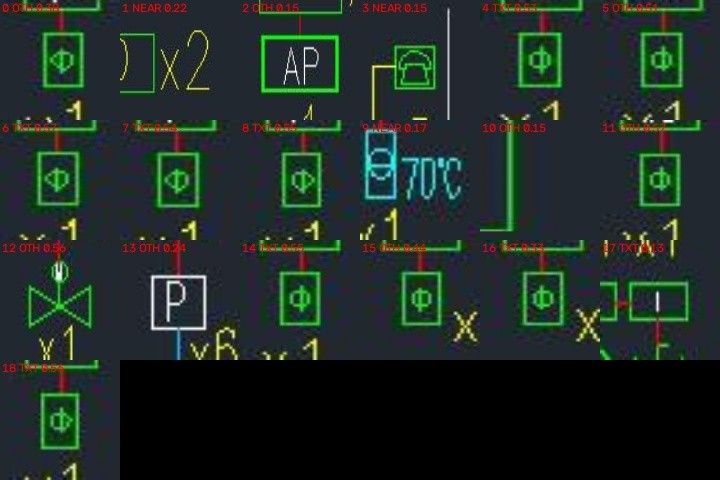
The false positives were more interesting. I went through all 19 of them, and 15 were real symbols that the dataset had simply not labeled (mostly boxes with a Φ, plus AP and P boxes and a valve). Counted as “is this a graphic symbol”, precision is about 99% (412/416). It is also a reminder that every number below is capped by label quality.
Step 2: OCR, and removing straight lines
Off-the-shelf OCR can barely read single letters like D or K1 on wires, because the wire runs right through the letter. I tried RapidOCR (the PP-OCR family), Apple Vision and Tesseract.
The biggest win was preprocessing: find wires and frame lines with long horizontal and vertical morphological openings, subtract them from the binary image, then hand the result to OCR. On 1984 wire markers (RapidOCR, three orientations 0°/90°/270°):
| Preprocessing | Localization recall | Read correctly (strict) |
|---|---|---|
| Original image | 11.1% | 8.5% |
| Lines removed | 96.5% | 57.9% |
Localization recall went up almost 9x. Apple Vision showed the same pattern, from 6.5% to 28.0%. Vertical text was handled by rotating the whole image by 90° and 270° and running OCR again: vertical K2 went from 0/31 to 30/31.
Removing lines has a price, though. K1, K2, K6, K8, K9 and BC together were read correctly 94.7% of the time (568/600), while D was located 95% of the time but read correctly only 41.9%. Line removal also erases the straight side of the D, and the remaining arc gets read as C, 口, 0 or [.
Step 3: training-free one-shot classification
First I tested classification on its own: given ground-truth boxes and 1 or 5 examples per class, can it get the class right? So that the pairwise methods could finish, all methods share the same 877 queries (up to 30 per class; micro scores are reweighted by the class frequencies of the full set).
| Method | 1-shot micro | 1-shot macro | 5-shot micro | 5-shot macro |
|---|---|---|---|---|
| NCC template matching (strokes) | 50.3 | 77.3 | 87.9 | 94.4 |
| NCC template matching (color) | 64.4 | 73.1 | 89.0 | 90.7 |
| DINOv2-small CLS | 59.5 | 79.5 | 86.3 | 89.8 |
| DINOv2-base CLS | 61.4 | 80.5 | 88.8 | 91.8 |
| DINOv2-small patch matching | 63.0 | 81.2 | 87.6 | 92.2 |
| CLIP ViT-B/16 image embedding | 65.1 | 81.7 | 91.7 | 93.8 |
| CLIP ViT-B/16 patch matching | 68.4 | 86.4 | 92.8 | 95.2 |
| CLIP patch matching + rotated examples | 82.4 | 85.9 | 95.8 | 94.5 |
(Means over 5 seeds, in %; standard deviations are in the original log.)
A few observations:
- CLIP beats DINOv2, and DINOv2-base is no better than small. Many of these symbols differ only by their text (Mpy, Mbf, Mxfb). My guess is that CLIP, having seen huge numbers of image-text pairs, is more sensitive to letter shapes, but I did not test that specifically. With CLIP, accuracy on Mpy/Mbf/Mxfb is 95% to 100%.
- Orientation is the biggest trap. 128 of the 474 K1 instances are vertical, and a D on a vertical wire is drawn as an arch. Storing every example at 0°, 90° and 270° lifted micro from 68.4 to 82.4, and D from 54% to 84%. The cost: vertical K9 dropped from 74% to 37%, because a rotated K8 looks too much like a vertical K9. For those two classes, orientation itself carries class information.
- Going from 1 example to 5 typically adds 10+ points of micro accuracy, and it is the cheapest improvement there is.
- It tolerates sloppy boxes well: shifting boxes by ±10% and scaling them by 0.9 to 1.15 costs only 1.1 points of micro.
- Open-set rejection is weak: the best AUROC is 0.853, and when 95% of known classes are kept, only about 31% of unknown classes get rejected. Maximum similarity is not a reliable “I don’t know this” signal.
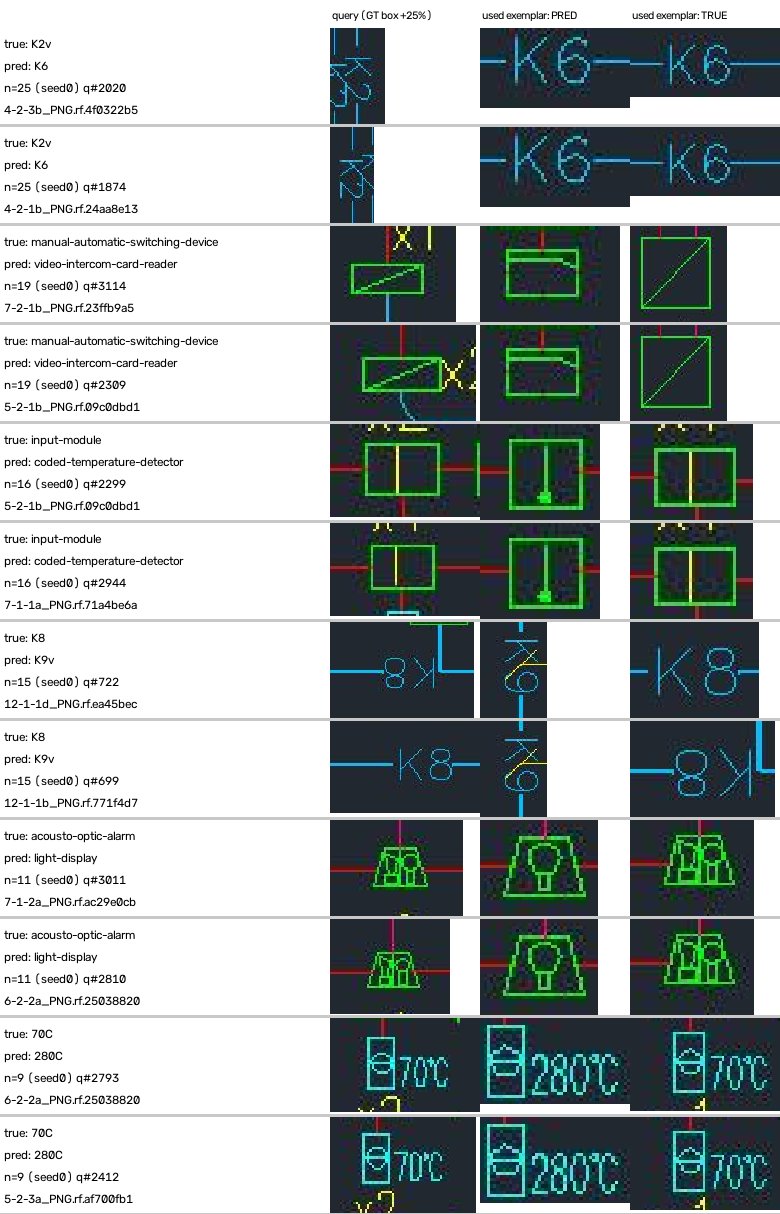
Most remaining errors make sense: the same class drawn differently on different drawings (the manual/automatic switching device), different classes with nearly identical outlines (acousto-optic alarm vs. light display), and 70°C vs. 280°C smoke exhaust valves that differ only in a few characters, at varying font sizes.
Step 4: end to end, classification without training
Chaining the steps above (detector + line-removed OCR + merge rules + CLIP patch matching with rotated examples + a global rejection threshold), with parameters tuned only on the validation groups and the test set evaluated once:
- 1-shot: F1 micro 80.7±4.0, macro 77.9±5.6 (precision 91.2, recall 72.5).
- 5-shot: F1 micro 88.2±1.0, macro 90.3±1.6.
- Replacing detection and OCR with ground-truth boxes (no rejection) gives 86.4 for 1-shot and 98.4 for 5-shot. So the upstream stages and rejection together cost about 6 to 10 points.
Time per image, measured on an idle machine, was 5.64 seconds, most of it the three-orientation full-image OCR (2.43 seconds).
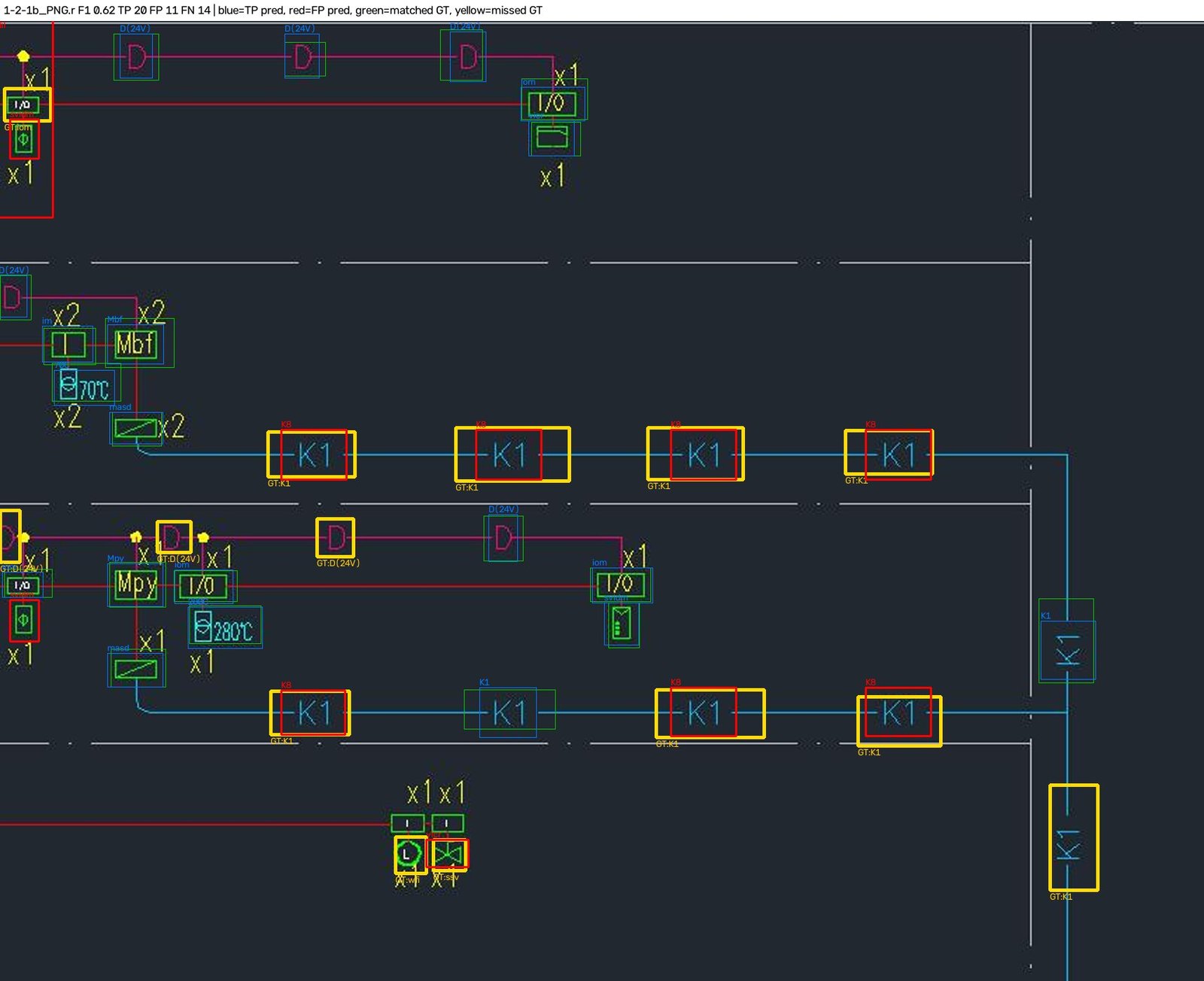
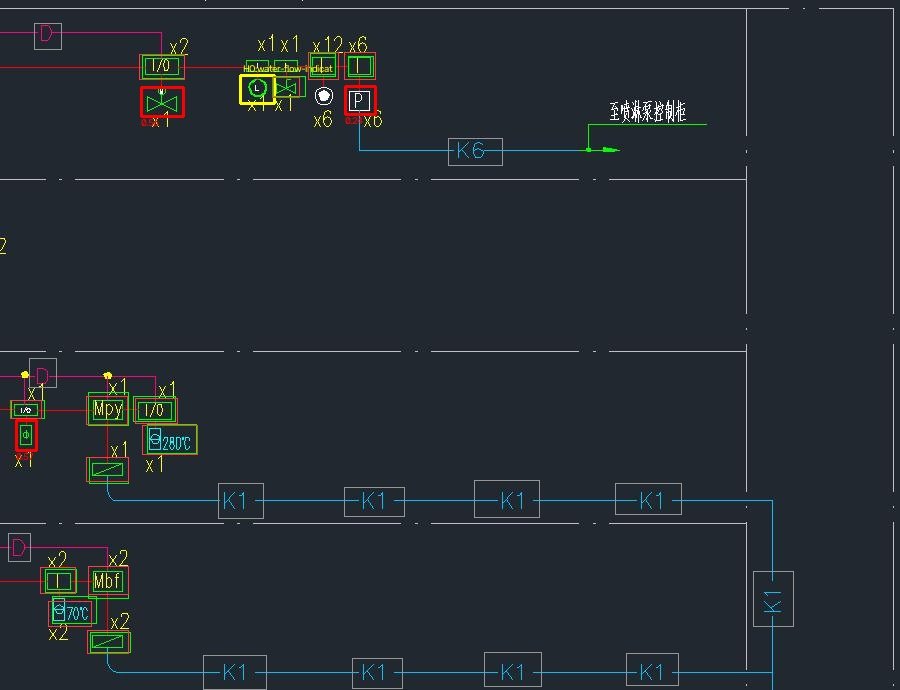
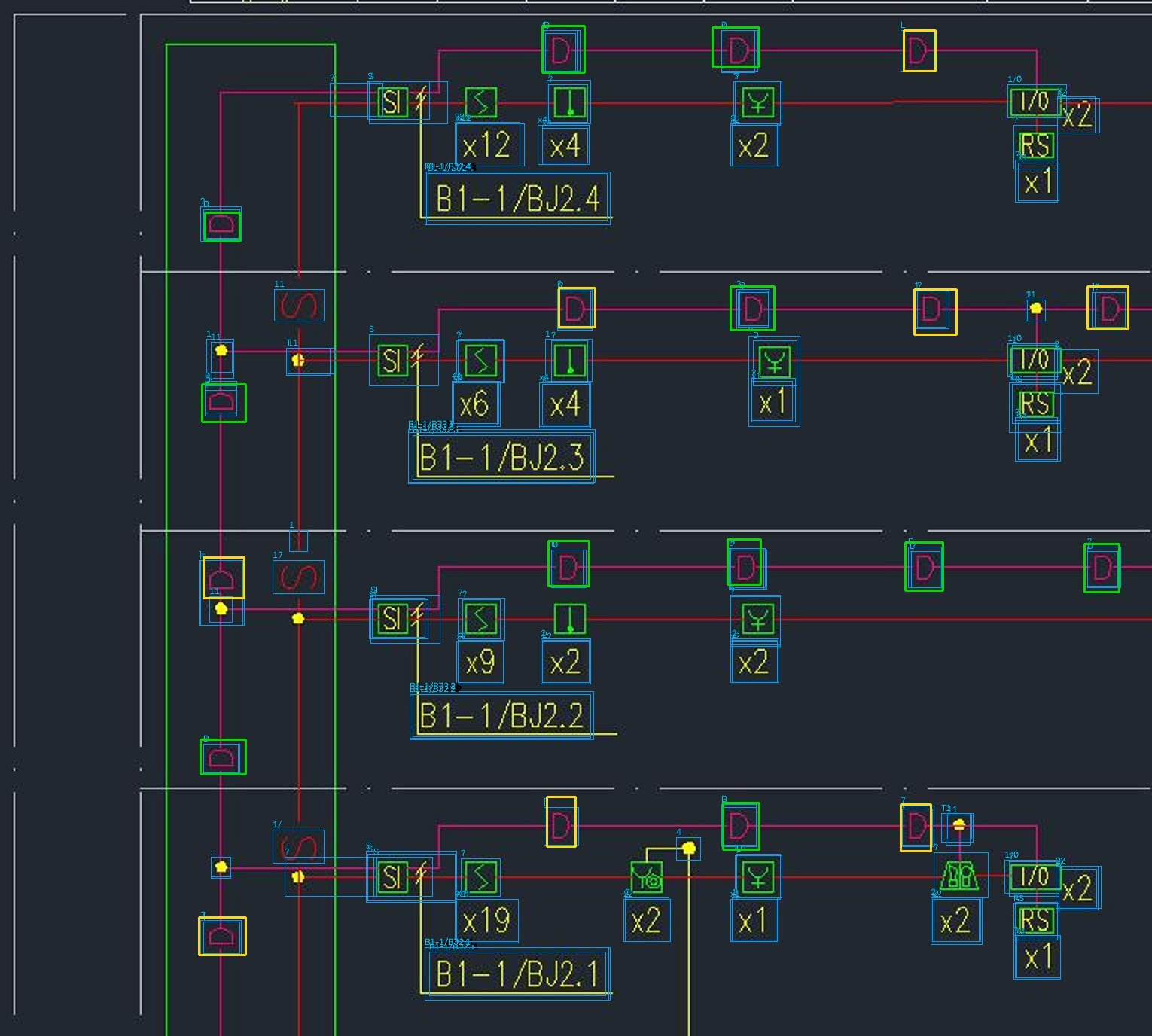
The largest single loss is still D. On ground-truth boxes, CLIP ranks D first 90% of the time, but D’s median similarity is only 0.924 and the global rejection threshold is 0.921, so 33% of D’s get rejected. In the image above, the rows of K1 are classified as K8 because the K1s in this test image are drawn inside a frame, while the example is not.
Some attempts that did not work, for the record:
- Per-class adaptive rejection thresholds: 1-shot micro went from 80.7 to 81.5, but macro dropped from 77.9 to 74.1, so I did not adopt it. D and background text (the C’s and 口’s left after line removal) already overlap in CLIP feature space, and no threshold separates them.
- Using the examples’ OCR text to help classification: the examples’ own OCR is unreliable (a K1 example was read as 4K1, and 24V as 亡), and a text-first variant did worse on validation. Even with user-confirmed example text, the overall score only went from 80.7 to 82.0, within the seed-to-seed spread.
- Dropping full-image OCR candidates: 1-shot fell to 57.5. 51% of the test boxes are text markers, and right now only OCR proposes candidates for them, so OCR has to stay.
Step 5: adding a little training
Since the bottlenecks were text markers and telling symbols from background, I trained two things, about 72 minutes in total:
- A new detector, det_v2: it treats text markers as “symbols” too, fixes the previous run’s problem of mosaic augmentation switching off too early, and trains for a fixed 80 epochs, in 58.7 minutes.
- A matching head: CLIP’s patch tokens stay frozen, and only a 768-to-256 linear projection is trained with a supervised contrastive loss, in 13 minutes.
In this round the novel classes are the 8 held-out graphic classes plus K1 (as a text marker it has never seen); the other 32 classes are base classes. The test set is the same 30 images and 824 boxes.
| Setup | What was trained | 1-shot F1 | 5-shot F1 |
|---|---|---|---|
| End-to-end v0 | Only the class-agnostic detector | 80.7 | 88.2 |
| det_v2 + matching head, detector candidates only | Detector + matching head | 94.3 | 95.2 |
| Fully supervised multi-class YOLO11s (control) | 32 classes, fully supervised | 81.4 (0 on novel classes) |
Breakdown of the best setup (1-shot): base classes 97.0, novel classes 83.8 (90.1 averaged per class).
A few things need to be said plainly:
- 94.3 does not mean every class was seen only once. The base classes were seen while training the detector and the matching head; only the novel classes are truly one-shot. And the novel-class micro score is dominated by K1 (110 of the 169 novel boxes).
- The matching head overfits fast: novel-class accuracy on validation was 88.3% at step 250 and fell to 48.3% by step 1500. I picked the checkpoint by validation novel-class accuracy, so the novel-class test numbers may be slightly optimistic.
- Once the new detector found the text markers on its own, OCR candidates became the main source of false positives. Dropping them raised overall F1 from 90.4 to 94.3.
- With the same training data, the fully supervised multi-class YOLO reaches 91.3 F1 on base classes, about 6 points below “class-agnostic detection + matching”. It loses mostly on precision (86.2), and it cannot recognize novel classes at all.
Against a fully supervised model
As an upper-bound reference, I called the fully supervised model hosted on Roboflow for the same project (firefighting-device-detection/5, 41 classes, about 2600 training boxes).
The catch: 24 of my 30 test images are in its training set. The only fair comparison is on the 6 images neither side has seen (139 boxes):
| Method | F1 micro | F1 macro |
|---|---|---|
| Roboflow fully supervised (conf 0.4) | 95.9 | 98.9 |
| My end-to-end v0.3, 1-shot (training-free classification) | 81.0±4.9 | 87.1±6.2 |
| My end-to-end v0.3, 5-shot (training-free classification) | 89.6±1.2 | 94.0±2.5 |
v0.3 is end-to-end v0 without the “crop each detection and OCR it again” step, which brought no gain in the ablation and became the default. At 5-shot, the gap to the supervised model is about 2 to 10 points on graphic classes and about 10 on text markers. The trained version was not evaluated on these 6 images, so it cannot go into this table.
Keep in mind that its validation and test images come from the same source drawings as its training images, in the same drawing style, while my examples are forced to come from a different source drawing. So it is an upper bound for “fixed classes, same style”, not a competitor starting from the same line. It also shows something useful: on this dataset, supervised training on about 100 images already exceeds 95, so the dataset itself is not hard for supervised learning.
What I learned
- Preprocessing can matter more than the model. Removing lines took OCR localization recall from 11% to 96%; no choice of OCR engine made a difference anywhere near that.
- “Is it a symbol” generalizes better than “which symbol”. The class-agnostic detector mostly finds novel shapes, but an outline absent from training (the circle) gets missed as a whole class.
- More examples are the cheapest improvement. End to end, going from 1-shot to 5-shot adds 7.5 micro and 12.4 macro, with no training at all.
- Rejection is the weakest link. Without it precision is only 50.5; with it, classes whose similarity is naturally low, like D, get killed. Thresholds alone cannot fix this.
- The evaluation protocol sets the difficulty. Same-source testing and cross-drawing testing are different things; before comparing, check whether the test images appear in the other side’s training set.
- The labels themselves are noisy. 15 of the detector’s 19 false positives were missing labels, and K2 and Mpy have some wrong labels. The numbers were obtained under that ceiling.
The limits of this experiment, too: one dataset in one drawing style; a test set of only 30 images, with 5 to 11 instances per held-out class, so confidence intervals are wide (for example, the 95% interval for 37/42 is roughly 74% to 96%); no testing at all across projects or design firms; and some timings were taken while the machine was heavily loaded.
Next steps
- Broaden the detector’s shape coverage: paste random line-art primitives (circles, triangles, diamonds, boxes with letters) onto real drawing backgrounds, and mark unlabeled symbols as ignore regions, so that round symbols are no longer missed as a whole class.
- An interactive loop: after the first pass, let the user confirm a few results and add them straight to the example library. The jump from 1 to 5 examples says this pays off better than more model tuning.
- A hybrid approach: supervised training with a modest amount of labels for common symbols, and one-shot only for symbols that are new.
- A better representation for D: more examples that cover the vertical arch, or some small-scale metric learning, to pull D apart from background text.
- Testing on other drawings: run it on drawings from other sources with other styles, and see how much of this pipeline survives outside this dataset.